

Hide TV Wires Like a Pro Creative Cable Management Ideas

A beautiful TV setup can lose its polish fast when black cords dangle down the wall. Power cables, HDMI leads, consoles, soundbars, streaming devices, and routers all add up. The good news is that you do not need a full renovation to fix it.
With the right method, a few basic tools, and a bit of planning, you can create a cleaner home entertainment area in an afternoon. Some solutions hide wires on the wall. Others send them through the wall. A few turn the problem into part of the decor.

Start with a simple cable plan
Before buying anything, unplug the TV area and map what you actually use. This small step prevents messy bundles later.
Check these items:
Power cord for the TV
HDMI cables for game consoles, receivers, or streaming boxes
Optical or HDMI eARC cable for a soundbar
Ethernet cable, if used
Speaker wire, if part of the setup
Charging cables for controllers or remotes
Group cables by destination. For example, all console cables should travel together toward the media console. A soundbar cable may only need a short, neat path under the TV.
Use shorter cables where possible. Extra cable length creates bulky coils, which are harder to hide. If a 1 m HDMI cable works, do not use a 3 m cable just because it came in the box.
Also check cable ratings. For in-wall work, use cables rated for in-wall use. Do not run a regular TV power cord through the wall unless it is part of an approved in-wall power kit that follows local electrical rules.
Use cable management systems for a fast clean-up
Cable raceways, sleeves, clips, and Velcro ties are the quickest way to hide TV wires without cutting into drywall. This method works well for renters, condos, and anyone who wants a low-risk upgrade.
A paintable cable raceway is usually the best choice when wires need to travel from a wall-mounted TV down to a console. It is a slim plastic channel that sticks or screws to the wall. Once painted the same colour as the wall, it blends in surprisingly well.
How to install a cable raceway
Measure the cable path
Measure from the bottom of the TV to the top of the media console or outlet area. Add a little extra room so cables are not pulled tight.
Choose the right size
Pick a raceway wide enough for all cables without forcing the cover shut. If you expect to add a gaming system or soundbar later, size up.
Clean the wall
Wipe the wall with a dry cloth. If using adhesive backing, the surface needs to be dust-free.
Cut the channel to length
Use a small saw or utility knife, depending on the product. Cut slowly so the edge stays clean.
Mount the raceway
Stick it in place or use screws for a stronger hold. A level helps keep the line straight.
Place the cables inside
Keep power cables and signal cables slightly separated if the channel has dividers. This helps reduce clutter.
Snap on the cover and paint it
Paint the raceway to match the wall. Let it dry fully before touching up edges.

For loose cords behind a console, use fabric cable sleeves or Velcro ties. Avoid zip ties if you change devices often. Velcro is easier to reopen and less likely to pinch cables.
Choose wall-mounted solutions for the cleanest look
If you want the most polished result, hide the wires behind the wall. This works especially well when the TV is mounted above a console, fireplace-style mantel, or floating cabinet.
The safest DIY-friendly option is an in-wall cable management kit. These kits usually include wall plates that create a tidy entrance and exit point for low-voltage cables such as HDMI. Some also include a code-compliant power solution.
If you are not comfortable with electrical work, hire a licensed electrician. This is especially wise for brick walls, older homes, or setups that need a new outlet behind the TV.
How to run cables through the wall
Find the studs
Use a stud finder before cutting. You want the cable path to run through an open wall cavity, not through wood framing.
Mark the wall plates
Place one opening behind the TV and another behind the media console. Keep them aligned vertically when possible.
Check for hidden obstacles
Avoid cutting near plumbing, existing outlets, or light switches. If anything feels uncertain, stop and get help.
Cut the openings
Use a drywall saw and follow the template included with the kit. Cut carefully. A neat opening makes the wall plate sit flat.
Feed the cables
Use fish tape or a pull cord to guide HDMI, Ethernet, and audio cables from the upper plate to the lower plate.
Install the plates
Secure the wall plates, then connect your devices. Leave a small service loop so cables are not under tension.
Test everything before closing up
Turn on the TV, console, and soundbar. Make sure the picture, sound, and network connections work.

For a neat finish, choose right-angle HDMI adapters if the TV sits close to the wall. They reduce strain and help the screen stay flush.
Try decorative options when hiding everything is not possible
Some rooms make cable hiding tricky. Brick walls, rental restrictions, awkward outlet locations, and fireplaces can limit your choices. That does not mean the wires have to look messy.
Decorative solutions can turn cords into part of the room design.
Try these ideas:
Use a decorative cord cover in wood, metal, or a colour that matches shelving.
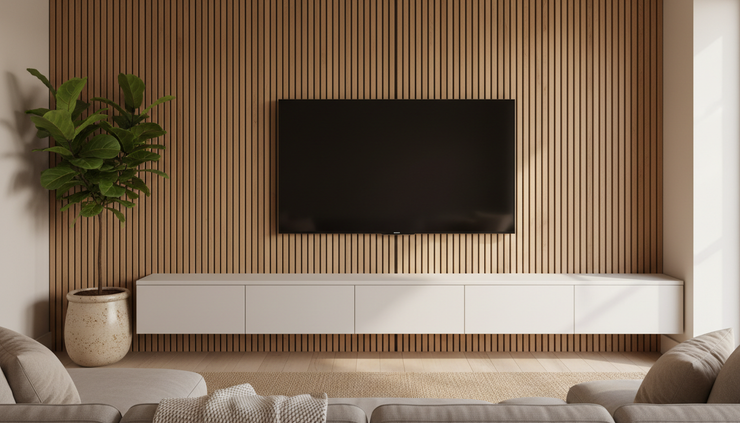
Place a tall plant beside the media unit to soften a visible cable path.
Use a floating shelf under the TV to shorten the visible drop.
Add a slatted wood panel behind the TV and run cables between the slats.
Use a fabric-wrapped cable sleeve for a softer look in cosy rooms.
Hide devices in baskets or boxes with rear openings for ventilation.
How to build a simple decorative cable cover
Pick a finish that suits the room
White blends into most walls. Wood tones work well with warm shelves, rattan, or mid-century furniture.
Measure the visible cable run
Keep the cover as short as possible. The less area you cover, the more intentional it looks.
Choose a lightweight material
A slim wood strip, cord cover, or peel-and-stick wall panel can work. Make sure cables are not squeezed.
Attach it cleanly
Use removable strips for rentals or small screws for a more secure fit. Check weight limits first.
Style around it
Add a small shelf, framed art, or plant nearby so the cover feels like part of the room.
Choose tools and materials that make the finish look professional
The right supplies matter more than fancy tools. A clean cable job usually comes from careful measuring, straight lines, and cable paths that make sense.
Keep these basics nearby:
Tool or material | Best use |
Stud finder | Locating safe wall cavities |
Painter’s tape | Marking cable paths without damaging paint |
Level | Keeping raceways and shelves straight |
Velcro ties | Bundling cables without crushing them |
Fish tape | Pulling cables through walls |
Paintable raceway | Hiding wires on the wall |
In-wall rated cables | Safer cable runs inside walls |
Label tags | Identifying HDMI, audio, and power cables later |
Label both ends of every cable before hiding them. A tiny label that says `Console HDMI` or `Soundbar eARC` can save a lot of frustration when something gets unplugged.
Finish with small details that matter
Once the wires are hidden, step back and look at the full setup. Centre the TV, straighten the console, and remove unused devices. A cable-free wall looks even better when the area around it feels intentional.
Leave enough airflow around consoles and receivers. Avoid stuffing power bars into sealed boxes. If you use baskets, choose ones with openings in the back or sides.
A clean TV wall does not need to be expensive. Start with a cable raceway if you want a quick fix. Choose in-wall routing for the most seamless result. Use decorative covers when the room calls for a creative touch. With a little planning, your entertainment setup can look calm, tidy, and built to belong there.


Comments